Encoding · Byte comparison
CSV vs CSV UTF-8
A CSV UTF-8 file is an ordinary CSV whose text is encoded as UTF-8, and it usually starts with a three-byte mark (EF BB BF). Choose it when your data has accents or non-Latin letters. The commas and rows are identical; only the bytes for characters outside plain English differ. The mark matters mostly for Excel: Microsoft says a UTF-8 CSV opens normally if it was saved with the mark.
The same three rows, four encodings
These four files contain the same text: Zoë Müller, José Peña, Chloé Dubois. Sizes and bytes below are read from the files themselves.
| File | Encoding | Size | First bytes | ë is stored as |
|---|---|---|---|---|
| cafe-utf8-bom.csv | UTF-8 with BOM | 88 bytes | EF BB BF 69 64 2C | C3 AB |
| cafe-utf8.csv | UTF-8, no BOM | 85 bytes | 69 64 2C 6E 61 6D | C3 AB |
| cafe-windows-1252.csv | Windows-1252 | 77 bytes | 69 64 2C 6E 61 6D | EB |
| cafe-utf16.csv | UTF-16 LE with BOM | 156 bytes | FF FE 69 00 64 00 | EB 00 |
Three bytes separate the first two rows of that table: that is the byte order mark, or BOM. The Unicode FAQ describes it for UTF-8 as a signature that identifies the encoding. It has no effect on how the text is read. The Windows-1252 file is smaller because each accented letter takes one byte instead of two, but that encoding only covers Western European letters: asking Python to save 東京 as Windows-1252 raises an error, and with errors="replace" the two characters become ??.
What the wrong guess looks like
A CSV file does not say which encoding it uses. RFC 4180 leaves the character set to a MIME parameter, which a file on disk does not have. So software guesses, and a wrong guess produces one of two recognisable patterns:
| You see | What happened | Fix |
|---|---|---|
Zoë Müller | UTF-8 bytes read as Windows-1252 | Re-open as UTF-8 |
Zo� M�ller | Windows-1252 bytes read as UTF-8 | Re-open as Windows-1252 |
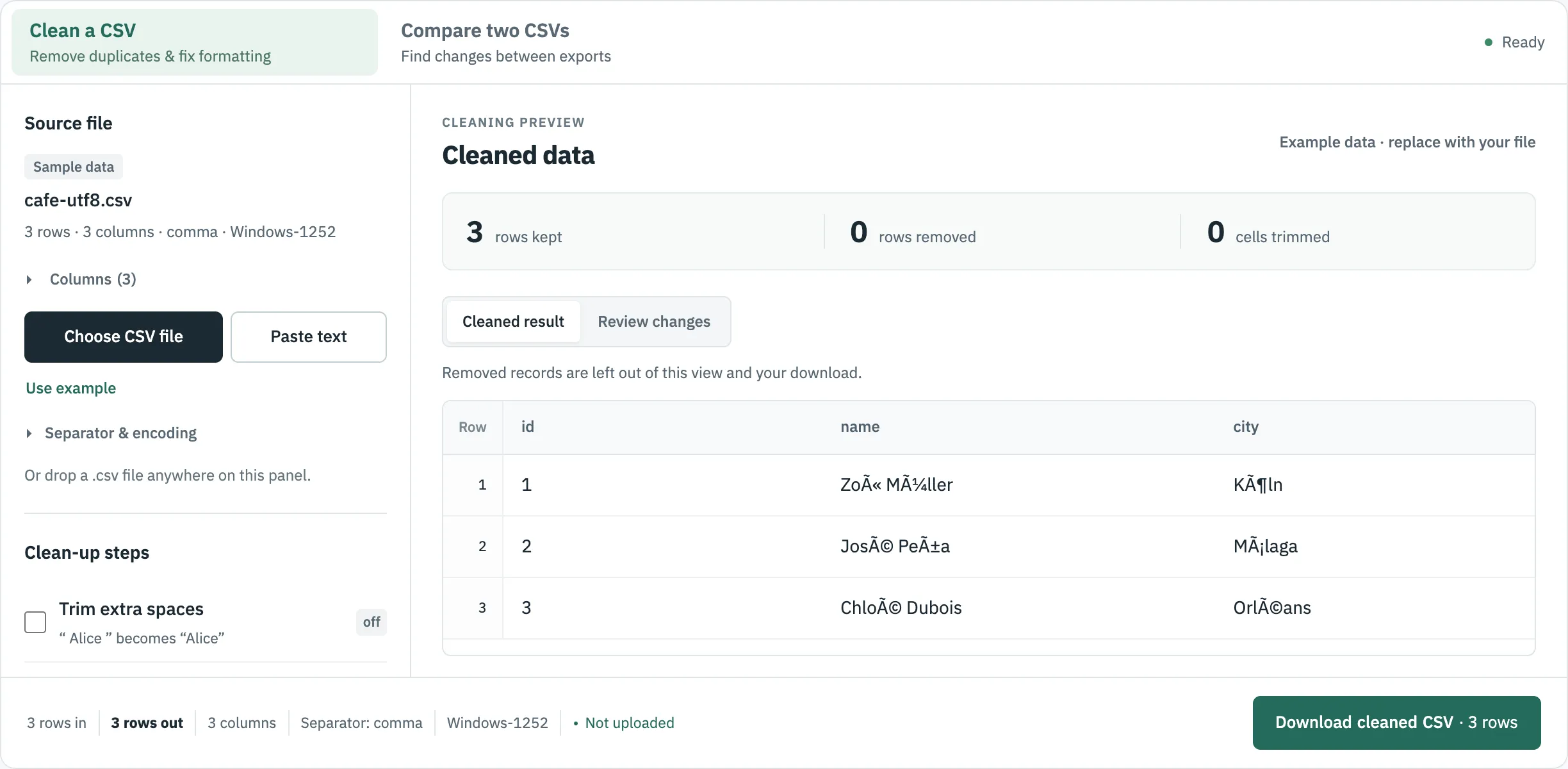
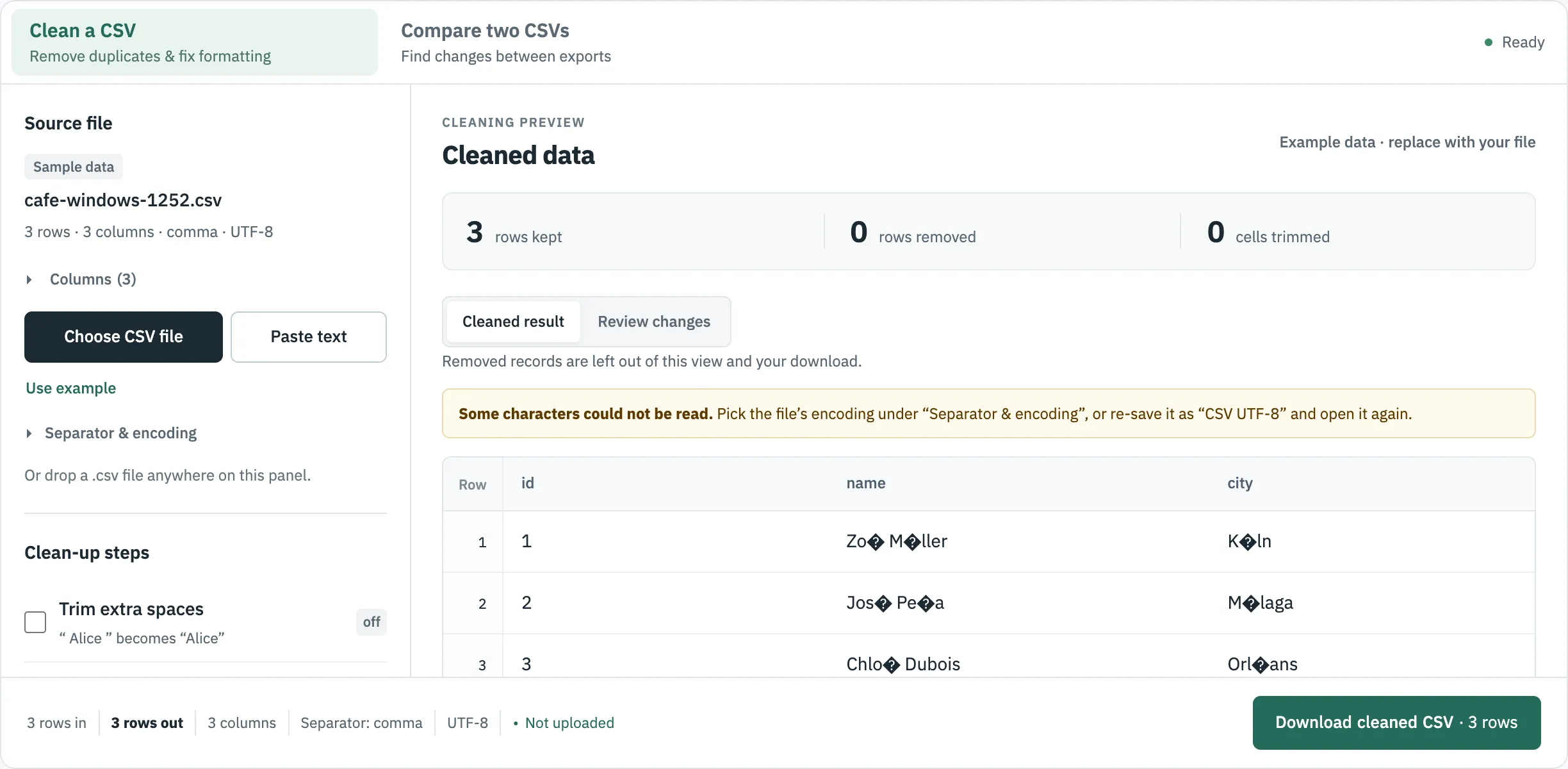
The first pattern can be undone by re-reading the original with the right encoding. If a program has saved the file with replacement characters, the letters are gone from that copy, so go back to the source. On auto-detect, CSVLane read all four test files correctly, using the BOM if there was one, then strict UTF-8, then Windows-1252 with a notice.
The BOM cuts both ways
The mark helps Excel and hurts some scripts. Here are the Python results on these files (3.9.6, csv.DictReader):
| File | Opened as | First column name | Result |
|---|---|---|---|
| UTF-8 with BOM | utf-8 | \ufeffid | A lookup of row["id"] fails; the name has an invisible character |
| UTF-8 with BOM | utf-8-sig | id | Correct |
| UTF-8, no BOM | utf-8-sig | id | Correct, so this setting is safe for both |
| Windows-1252 | utf-8 | — | UnicodeDecodeError at the first ë |
| UTF-16 LE | utf-8 | — | UnicodeDecodeError at byte 0 |
The Unicode FAQ makes the same point in general terms: a BOM should be avoided with protocols that expect ASCII at the start.
Which one to choose
| Where the file is going | Use | Reason |
|---|---|---|
| Opened by people in Excel | UTF-8 with BOM | Microsoft says this is the form that opens normally |
| Code, a database or an API | UTF-8, no BOM, unless its documentation says otherwise | No hidden character in the first column name |
| A legacy system that asks for “ANSI” | Windows-1252, if all your characters fit | Check for lost characters afterwards |
| Unsure | UTF-8 with BOM, then test one file | Holds any character |
Microsoft’s format table describes CSV (Comma delimited), CSV (Macintosh) and CSV (MS-DOS) by target system and names no encoding, so check a saved file rather than trust the name. Load it in CSVLane and read the encoding in the status line. CSVLane’s own CSV downloads are UTF-8 with a BOM; its JSON output has no BOM.
If a UTF-8 CSV without the mark looks wrong in Excel, Microsoft’s fix is to import it through Data > Get Data > From Text/CSV rather than open it. More on that in how to open a CSV file.
Where to go next
Sources
- Microsoft Support: Opening CSV UTF-8 files correctly in Excel, read 30 October 2026.
- Microsoft Support: File formats that are supported in Excel, read 30 October 2026.
- Unicode FAQ: UTF-8, UTF-16, UTF-32 & BOM, read 30 October 2026.
- RFC 4180: Common Format and MIME Type for CSV Files, read 30 October 2026.
- Python documentation: csv module, read 30 October 2026.