Opening CSV files · Comparison
How to open a CSV file
Double-click the file if you only need a quick look: it opens in your default spreadsheet program. If you plan to keep or re-save the data, import it with Data > From Text/CSV and set code columns to Text, because a spreadsheet may convert values such as 02134 as it opens them. To view it unchanged, use a text editor or CSVLane.
Six ways to open a CSV
| Route | Best for | What it does to values | Basis |
|---|---|---|---|
| Excel: double-click | A quick look, nothing saved | Applies the default format settings to each column; zeros and long numbers can change | Microsoft, FCC |
| Excel: Data > From Text/CSV | Working in Excel | Lets you set columns to Text before they load | Microsoft |
| Excel: rename to .txt, then open | Picking a format per column | Starts the Text Import Wizard, with a format per column | Microsoft |
| Google Sheets: File > Import | No Excel installed | Choose the separator or auto-detect. Google’s page does not cover conversion, so check your codes | |
| Text editor | Seeing exactly what is in the file | Keeps values as text, per the FCC; columns do not line up | FCC |
| CSVLane | Reading, cleaning or comparing without Excel | Keeps every cell as text; shows 400 rows, up to 15 MB, nothing uploaded | Tested below |
We did not run Excel or Sheets for this page. Rows marked with those sources describe what the linked pages say.
A test file with everything that goes wrong
open-test.csv has four rows, built so that any opening method can be judged in ten seconds. Open it your usual way and check these cells:
| Check | Value in the file | If you see something else |
|---|---|---|
| ID with zeros | 0007 | Leading zeros were dropped. See how to keep them |
| ZIP code | 02134 | Same conversion |
| Comma in a value | Portland, OR in one cell | The reader is not honoring quotes |
| Line break in a value | Two lines in one cell, on the Zoë row | The row was split in two |
| Accents | Zoë Müller, Köln | Wrong encoding. See CSV vs CSV UTF-8 |
| Short date | 3/14 and 12/2 | Read as dates; Microsoft’s example shows 12/2 becoming 2-Dec |
| Formula-like text | =1+1 | It shows 2: the cell ran as a formula |
Here is the same file loaded in CSVLane:
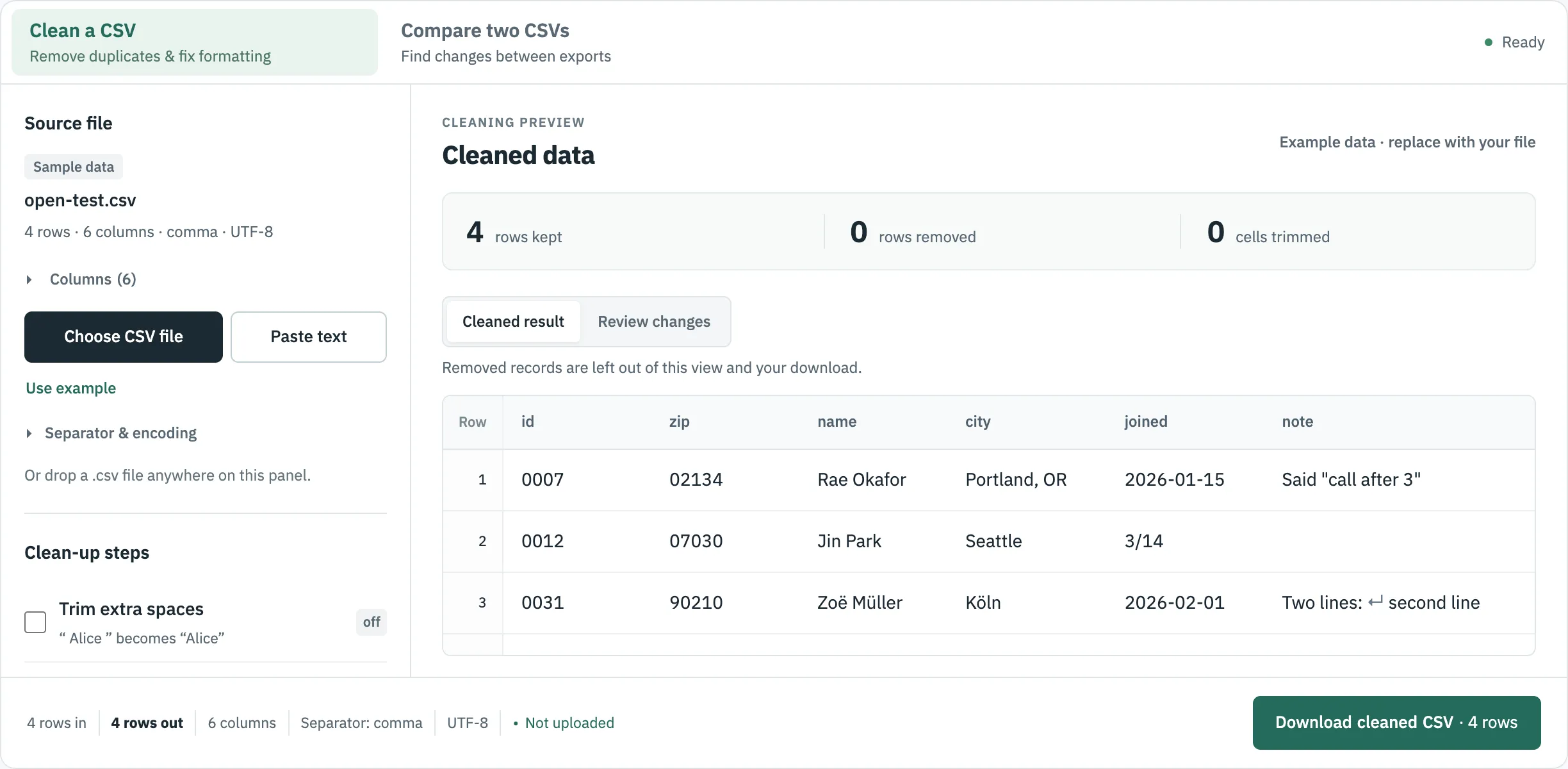
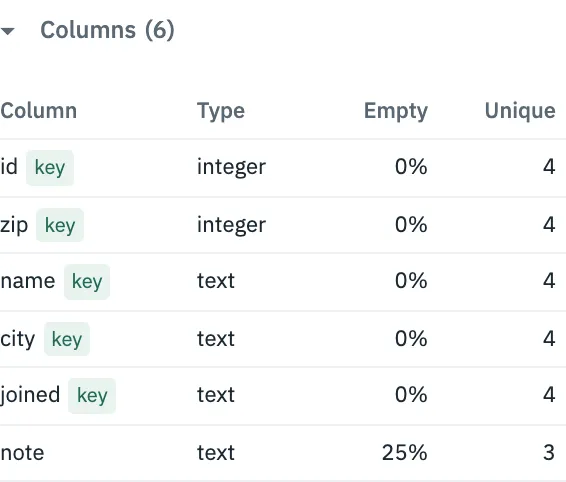
Under Columns you can read the structure of an unfamiliar file before doing anything with it. The list below says id and zip look like whole numbers, which is the warning to import them as text in a spreadsheet, and that note has an empty cell.
Open a CSV in Excel with codes intact
Microsoft’s route, in the order you will see it:
- Open a blank workbook and go to Data > From Text/CSV.
- Pick the file and click Import. A preview appears.
- Choose Edit or Transform Data to open the Query Editor. Select the code columns, then Home > Transform > Data Type > Text.
- In Change Column Type, choose Replace Current, then Close & Load.
These steps are from Microsoft’s page on keeping leading zeros. The FCC’s instructions for its data files make the same point more bluntly, telling filers not to double-click because census codes turn into numbers.
If it opens wrong
- Everything is in column A. The file probably uses semicolons or tabs. CSVLane detects the separator and can rewrite it with commas.
- Accents look like Zoë. That is an encoding mismatch, with a fix for each pattern.
- Rows look shifted or merged. Check for a broken quote with the CSV validator test.
- It is really a text file. See converting text to CSV.
Where to go next
Sources
- Microsoft Support: Import or export text (.txt or .csv) files, read 30 October 2026.
- Microsoft Support: Keeping leading zeros and large numbers, read 30 October 2026.
- Microsoft Support: Stop automatically changing numbers to dates, read 30 October 2026.
- Microsoft Support: Opening CSV UTF-8 files correctly in Excel, read 30 October 2026.
- Google Docs Editors Help: Import data sets & spreadsheets, read 30 October 2026.
- FCC: Opening a CSV File in Excel, read 30 October 2026.